
At some point, every growing team hits the same wall. Spreadsheets stop cutting it. Sticky notes on a whiteboard stop cutting it. Someone finally says the words “we need real project management software,” and that’s when the actual argument starts. Free or paid?
I’ve used both, honestly, across a bunch of different teams and budgets over the years. And the answer’s not as clean as “just pay for the good stuff.” Sometimes free is genuinely enough. Sometimes it quietly costs more than a subscription ever would, just not in dollars. Let’s get into it.
Table of Contents
What free plans actually give you
Most free tiers aren’t broken on purpose; they’re built to hook you first- that’s just how the business model works. You typically get task lists, maybe basic Kanban boards, a handful of projects, and a limited number of teammates. Enough to run something small without feeling boxed in right away.
If you’re freelancing solo, running a small side project, or just starting out as a startup, free tools honestly go further than most people expect. No need to commit money before you even know what you’ll use
The catch shows up later, always does. Free plans come with limits baked in: users, storage space, integrations, how much you can automate. Grow past five or six teammates, or start needing custom fields, and suddenly that plan feels a lot smaller than it used to
Where paid plans start pulling ahead
What you’re really paying for with paid tools is depth, not shiny extras. Gantt charts, resource management, workload views, detailed analytics- none of that ends up behind a paywall by accident.
If your team’s juggling multiple projects at once, coordinating across departments, or managing client work where accountability actually matters, paid tiers make life noticeably easier. Automations alone can save hours weekly, once you actually bother setting them up.
Support’s another quiet difference. Free users get forums, or a slow email queue. Paid customers usually get faster responses, sometimes a dedicated account manager on higher tiers. When something breaks mid-project, that gap matters more than people expect going in.
The hidden cost inside “free”
Here’s what people underestimate constantly. Free software isn’t really free once you count what your team loses in efficiency. Time spent working around limitations. Manually doing what automation would’ve handled instantly. Exporting data by hand because reporting’s locked behind a paywall.
I’ve watched small teams stick with a free plan way too long, purely because the price tag says zero. Meanwhile, hours get burned every week on manual workarounds a fifteen-dollar plan would’ve solved on day one. Eventually, time becomes the real cost. And time was never actually free to begin with.
When free is genuinely the smarter move
To be fair, free isn’t always the wrong call. Testing a new workflow, running something short-term, handling basic task management for a small team that isn’t scaling anytime soon- a free tool does the job fine without unnecessary spending.
Early-stage startups benefit here too. Cash is tight, priorities shift weekly, and locking into a paid plan before you even know your real needs is kind of a waste. Free tiers let you experiment first, upgrade once things actually settle down.
When paying finally makes sense
The switch to paid usually gets obvious once specific pain points show up. Your team keeps hitting user limits. You need integrations with tools you already rely on daily: Slack, Google Drive, your CRM. Reporting turns into something leadership actually asks for, not just a nice-to-have anymore.
Client-facing teams especially benefit here. Guest access, custom branding, detailed timelines- all of that makes a real difference in managing expectations for people outside your company. A free tool looking a little rough in front of a client can quietly hurt trust, even when the work itself is solid.
A quick way to decide
Take a second and ask yourself these before committing: Right now, how many people actually need to log in? Is this for a single project, or are multiple ones running simultaneously? And are there tools you already use every day that this needs to integrate with? Is reporting something you’ll need to show clients or leadership? Would automation actually save your team real hours weekly?
If most answers lean toward “yes, and soon,” paid’s probably worth it. If you’re still early, small, and figuring things out, free’s a perfectly reasonable place to start.
Comparing the two side by side
Sometimes it just helps to see it laid out instead of reading paragraphs about it.
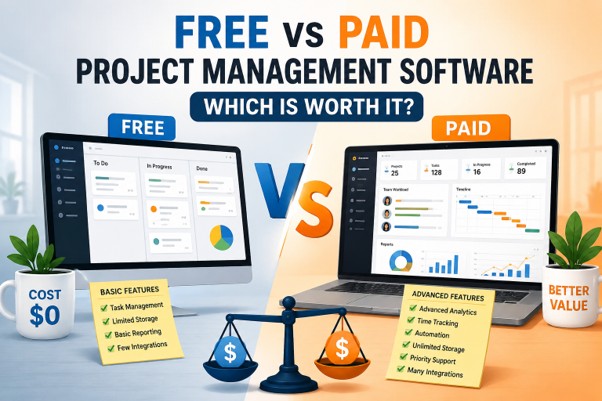
Free plans typically include:
Basic task lists and simple boards, a limited number of projects or team members, community support, or a slow email queue, minimal automation, if any, basic reporting, sometimes nothing at all
Paid plans typically add:
Gantt charts and workload views, higher, sometimes unlimited, user and project limits, custom fields, permissions, integrations, automation that handles the repetitive stuff, priority support, occasionally a dedicated contact, detailed analytics and exportable reports
Laid out like that, the decision usually feels less abstract. Neither option’s objectively better; it’s about which column matches where your team actually is right now, not where you hope to be in six months.
Team size changes everything
A two-person team and a fifty-person team have completely different relationships with the word free. Small teams can stretch a free plan surprisingly far; workflows stay simple, fewer moving parts, fewer approvals needed anywhere.
Bigger teams hit friction fast. Things like coordinating between departments, tracking project dependencies, or updating stakeholders without back-to-back meetings- all of it gets messier fast without the features paid plans offer. A small annoyance at five people turns into a real problem once you hit twenty-five.
It’s not really free versus paid; it’s fit versus mismatch
The real mistake isn’t choosing free or paid on its own. It’s picking a plan that doesn’t match where your team is right now. Overpaying for enterprise features you won’t touch for a year wastes money just as much as clinging to a free plan that’s obviously holding you back.
Most teams land somewhere in the middle eventually anyway. Start free, learn what actually matters through real use, then upgrade once the limitations become obvious instead of guessing upfront. That approach avoids wasted spending and wasted time both.
Final thoughts
No one-size-fits-all answer exists here, just whatever actually fits your team right now. Small, simple setups do fine on free tools. But once things get more complex, your team grows, or clients expect more, that’s when paid tools start justifying their cost. Try before committing either way. Most paid platforms offer free trials specifically so you can test whether the extra features solve real problems, instead of just sounding good on a features page. That trial period alone usually makes the decision obvious.
One more thing worth mentioning: don’t underestimate how much this decision shapes migration pain down the road. Moving everything over- project history, templates, integrations- to a new platform later isn’t as simple as it sounds. So if you can already tell your team might outgrow free within the year, go with a platform that has a paid tier built in from the start. That way, upgrading is just a click, not a whole rebuild.
More Read: How Technology Is Transforming Our Lives, Work, and Learning
FAQs
Is free project management software good enough for small teams?
Often, yeah. Teams under five or six people running straightforward projects usually get by fine on the basics.
What’s the biggest downside of free plans?
Limits, mostly. Users, storage, automation. Teams tend to outgrow free tiers faster than they expect once projects get more complex.
Are paid plans worth it for freelancers?
Not always. Solo freelancers with simple workflows can often stick with free tools for a long stretch before paying actually makes sense.
Do paid tools really save time?
Generally, yes. It comes down to automation mostly; less manual work means more hours back. And once a team scales, that saved time is worth more than the subscription price
Should I just start with a paid plan right away?
Not necessarily. Starting free and upgrading once real limitations show up tends to be the smarter, lower-risk move for most growing teams.